You can host your domain with us without transferring it from the registrar or third-party provider where you purchased it.
Every domain has a DNS zone, which allows the domain to connect to a hosting server through nameservers. These nameservers direct the domain to the server’s IP address.
To host a domain purchased from a third-party provider on your hosting package with us, follow these steps:
-
Add the domain to your hosting account
If the domain is the primary domain of your account, it should already have a DNS zone on the server.
If your hosting plan supports addon domains, add the domain through cPanel. This will automatically create a DNS zone for it on the server. Please refer to our tutorial on adding an addon domain in cPanel for detailed instructions.
-
Point the domain to your server’s nameservers
You can find the correct nameservers in your Client Area:
-
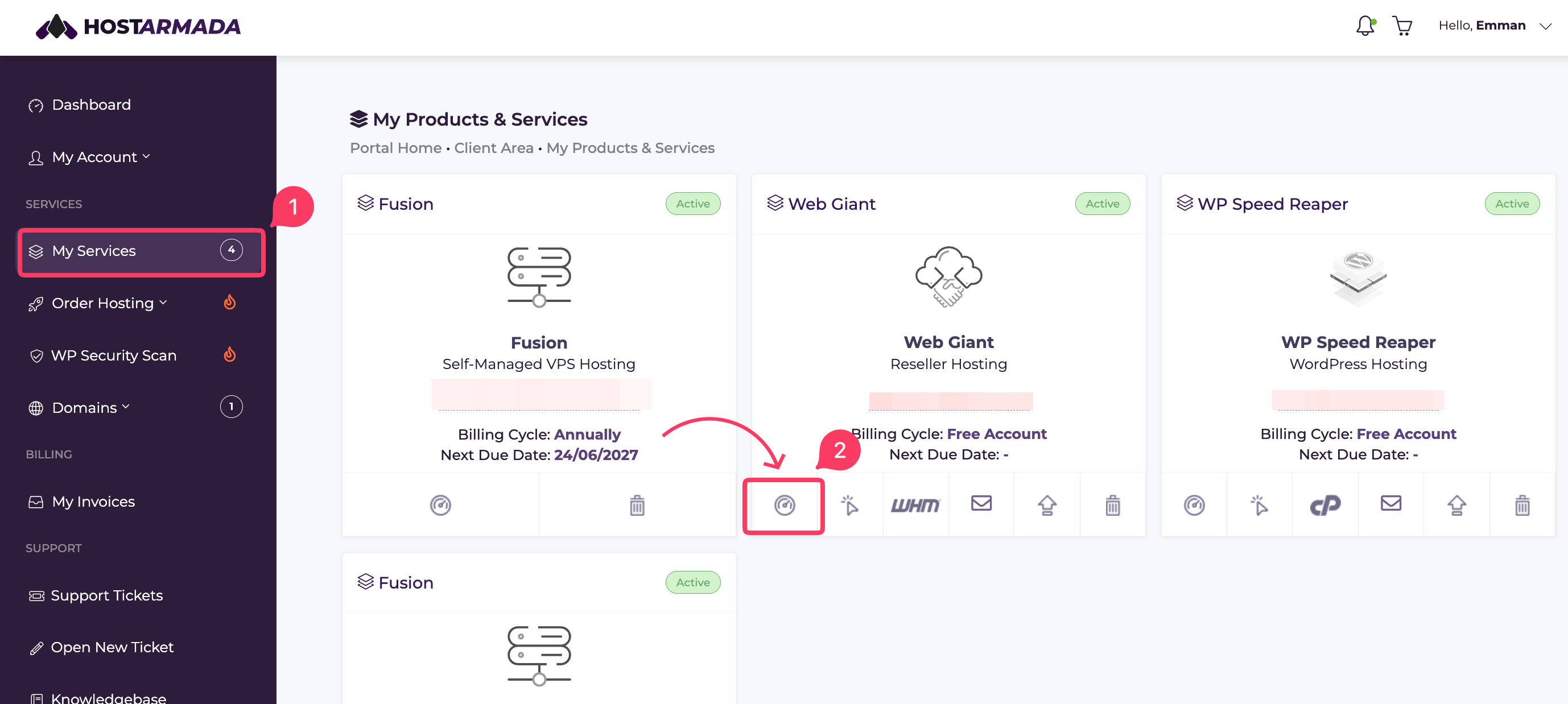
Select My Services from the menu on the left. It will open the Products page.
- Locate the box for the relevant hosting account and click on the Manage Services icon.
-
Within the Service Details section, you will see the details of your nameservers.
.png)
Once you have the nameservers, log in to your third-party domain provider’s dashboard and update the domain’s nameserver settings.
-
After you update the nameservers, DNS propagation will begin. This process may take some time to complete. Once propagation is finished, your domain will be connected to your HostArmada hosting account and ready to use.
